Introduction
You are filling out an online application. The form asks for First Name, Middle Name and Last Name/Surname.
You look at your Aadhaar, school certificate or other document and think: Which part goes where?
This is a very common problem. It becomes even more confusing when a person’s name has only one or two parts, or when the name follows a naming style that does not neatly fit the usual first-middle-last pattern.
Getting the name structure right matters because many government, banking, tax and other online systems use separate name fields. PAN is a particularly important example. A mismatch between the name entered in an application and the name recorded in the relevant database or supporting documents can create verification problems.
There is also an important point to remember: not every application follows exactly the same naming rule. The field structure and instructions of the particular form should always be checked before submitting it.
For PAN applications, this is especially important because the PAN application system changed from 1 April 2026, when new PAN application forms were introduced under the Income-tax Rules, 2026.
Let’s make the basic name structure easy to understand.
What Do First Name, Middle Name and Last Name Mean?
First Name
The first name is generally the personal or given name by which a person is identified.
For example:
RAHUL KUMAR SINGH
Here, RAHUL is the first name.
Other examples:
- AMIT Sharma
- PRIYA Nair
- MOHAMMAD Arif Khan
- NEHA RANI Das
The first name is usually the first part of a person’s full name, but the exact treatment can vary depending on the form and the person’s official naming structure.
Middle Name
The middle name is the name component that appears between the first name and the last name.
For example:
RAHUL KUMAR SINGH
- First Name: RAHUL
- Middle Name: KUMAR
- Last Name: SINGH
A person may have no middle name at all. In that situation, the middle-name field is normally left blank where the form permits it.
For a name such as RAHUL KUMAR SINGH YADAV, there are two components between the first and final parts:
- First Name: RAHUL
- Middle Name: KUMAR SINGH
- Last Name: YADAV
So, a middle name does not necessarily have to be just one word.
Last Name / Surname
The last name, also called the surname or family name, is generally the final part of a person’s name.
For example:
RAHUL KUMAR SINGH
Here, SINGH is the last name or surname.
Other examples include:
- RAHUL SHARMA
- PRIYA NAIR
- AMIT KUMAR DAS
- MOHAMMAD ARIF KHAN
However, not everyone has a conventional surname. This is particularly important when completing PAN-related forms.
First Name, Middle Name and Last Name: Examples
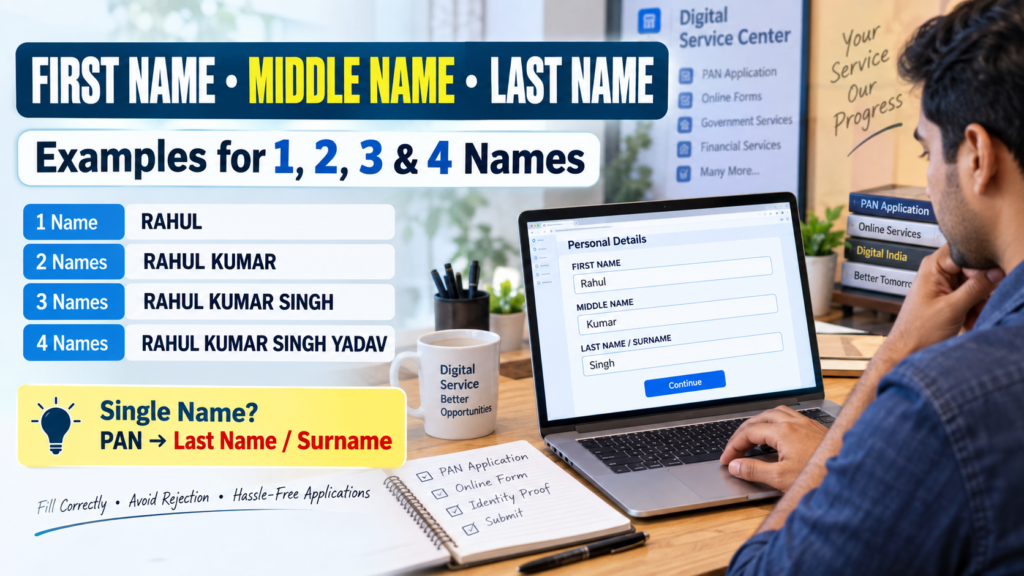
The easiest way to understand the structure is to look at names containing different numbers of parts.
| Number of Names | Example | First Name | Middle Name | Last Name |
|---|---|---|---|---|
| 1 Name | RAHUL | — | — | RAHUL* |
| 2 Names | RAHUL KUMAR | RAHUL | — | KUMAR |
| 3 Names | RAHUL KUMAR SINGH | RAHUL | KUMAR | SINGH |
| 4 Names | RAHUL KUMAR SINGH YADAV | RAHUL | KUMAR SINGH | YADAV |
*The treatment of a single name depends on the particular application. The PAN example is explained separately below.
Example 1: One Name — RAHUL
Suppose the person’s name is simply:
RAHUL
There is no separate middle name or surname.
For a PAN-style three-field structure where a single name is recorded in the surname field, the entry would be:
- First Name: Blank
- Middle Name: Blank
- Last Name/Surname: RAHUL
This is an important PAN-specific example. It should not be confused with forms that require a different treatment for a single name.
Example 2: Two Names — RAHUL KUMAR
Suppose the full name is:
RAHUL KUMAR
The usual two-part structure is:
- First Name: RAHUL
- Middle Name: Blank
- Last Name/Surname: KUMAR
There is no need to invent a middle name simply because the form has a middle-name field.
Example 3: Three Names — RAHUL KUMAR SINGH
For:
RAHUL KUMAR SINGH
the structure is straightforward:
- First Name: RAHUL
- Middle Name: KUMAR
- Last Name/Surname: SINGH
Example 4: Four Names — RAHUL KUMAR SINGH YADAV
For:
RAHUL KUMAR SINGH YADAV
a practical three-field arrangement is:
- First Name: RAHUL
- Middle Name: KUMAR SINGH
- Last Name/Surname: YADAV
The middle-name field can therefore contain more than one word if that is how the form accommodates a name with four parts.
Single Name in a PAN Application
This is where many applicants and Digital Service Center operators get confused.
Suppose the applicant’s name is:
RAHUL
There is no second name and no separate surname.
For the PAN-style name fields, the single name is entered in the Last Name/Surname field:
| PAN Name Field | Entry |
|---|---|
| First Name | Blank |
| Middle Name | Blank |
| Last Name/Surname | RAHUL |
So the correct example is:
Last Name/Surname: RAHUL
First Name: Blank
Middle Name: Blank
Do not automatically enter RAHUL in the First Name field just because RAHUL is the person’s only name.
This treatment is also reflected in PAN-related systems and Income Tax materials where a single name is handled through the last-name field. For example, Income Tax material states that for an individual PAN, the last name is mandatory in PAN verification, while first and middle names may be optional.
Older PAN application instructions also explicitly showed a single-name applicant’s name being entered in the Last Name/Surname field.
One important update for PAN applicants in 2026
There is a reason you may see different PAN instructions online.
From 1 April 2026, new PAN applications use the new Forms 93, 94, 95 and 96, replacing the earlier Forms 49A and 49AA. Form 93 is for Indian individual citizens, while Form 95 is for individuals who are not Indian citizens.
The new Form 93 structure asks for the applicant’s full name, so applicants should follow the fields and instructions displayed in the current PAN application they are actually submitting rather than relying on an old screenshot or an outdated article.
For a Digital Service Center operator, this distinction is important: always check whether you are working on the current PAN application format or an older form/interface.
Two-Name PAN Example
Consider:
RAHUL KUMAR
For a three-part PAN name structure, the usual arrangement is:
| Field | Enter |
|---|---|
| First Name | RAHUL |
| Middle Name | Blank |
| Last Name/Surname | KUMAR |
There is no reason to put RAHUL KUMAR in all three fields.
The purpose of separate fields is to identify the individual components of the name.
Three-Name PAN Example
Consider:
RAHUL KUMAR SINGH
The structure is:
| Field | Enter |
|---|---|
| First Name | RAHUL |
| Middle Name | KUMAR |
| Last Name/Surname | SINGH |
This is the simplest example of a conventional first-middle-last name.
Four-Name PAN Example
Now consider:
RAHUL KUMAR SINGH YADAV
If the application provides only three name fields, the practical structure is:
| Field | Enter |
|---|---|
| First Name | RAHUL |
| Middle Name | KUMAR SINGH |
| Last Name/Surname | YADAV |
The key idea is that the first component is the first name, the final component is the surname/last name, and the remaining component(s) can form the middle name where the form permits it.
Do not arbitrarily remove one of the name parts just to make it fit.
Your Official Documents Matter
When applying for PAN or another government service, do not treat the name fields as a completely independent naming exercise.
Look at the relevant supporting documents and the instructions for the particular application.
For PAN applications, the name and other particulars should be entered carefully and consistently with the applicable documents and application requirements. The Income Tax Department’s current PAN guidance confirms that new PAN applications are now made through the revised forms introduced from 1 April 2026.
At the same time, do not assume that the PAN rule automatically applies to every other website or government form.
For example, one application may ask for:
- First Name
- Middle Name
- Last Name
Another may simply ask for:
- Full Name
A third application may have a specific instruction for applicants who do not have a surname.
The safest approach is:
Check the application’s own instructions first, then enter the name according to the required format while keeping it consistent with the relevant official records.
This is especially important for Digital Service Center and Cyber Cafe operators who fill forms on behalf of customers. A familiar naming pattern is useful, but the form’s actual instructions should always take priority.
Common Mistakes When Entering Names
| Common Mistake | What to Do Instead |
|---|---|
| Entering the entire name in every field | Split the name into the appropriate name components |
| Treating a single-name PAN applicant like a three-part name | Follow the applicable PAN application’s single-name field requirement |
| Inventing a middle name | Leave the middle-name field blank when no middle name exists and the form permits it |
| Randomly shortening the name | Follow the official document and application instructions |
| Removing a name component to make it fit | Check whether the form allows multiple words in the relevant field |
| Using different name formats across applications | Maintain consistency where the application’s rules require it |
| Using initials without checking the rules | Follow the particular form’s instructions; do not assume initials are accepted |
| Copying an old PAN form example | Check the current PAN application format, especially after the 2026 form changes |
A Simple Way to Understand Any Name
When a form asks for three fields, think about the name from left to right:
First part → First Name
Last part → Last Name/Surname
Anything between them → Middle Name
For example:
AMIT KUMAR SHARMA
- AMIT → First Name
- KUMAR → Middle Name
- SHARMA → Last Name
For:
AMIT SHARMA
- AMIT → First Name
- SHARMA → Last Name
- Middle Name → Blank
For:
AMIT
- Do not automatically assume that AMIT should go into First Name.
- For a PAN-specific single-name structure, the single name is placed in the Last Name/Surname field.
Again, this is a useful way to understand PAN-style name fields, not a universal rule for every online form.
Quick Reference Table
Save or screenshot this table for quick reference:
| Name | First Name | Middle Name | Last Name/Surname |
|---|---|---|---|
| RAHUL | — | — | RAHUL* |
| RAHUL KUMAR | RAHUL | — | KUMAR |
| RAHUL KUMAR SINGH | RAHUL | KUMAR | SINGH |
| RAHUL KUMAR SINGH YADAV | RAHUL | KUMAR SINGH | YADAV |
*For a single-name PAN structure. Always follow the current application’s instructions.
Frequently Asked Questions
What is a first name?
A first name is generally the personal or given name of an individual. In RAHUL KUMAR SINGH, RAHUL is the first name.
What is a middle name?
A middle name is a name component that comes between the first name and the last name. In RAHUL KUMAR SINGH, KUMAR is the middle name.
What is a last name or surname?
The last name, also called the surname, is generally the final part of the person’s name. In RAHUL KUMAR SINGH, SINGH is the surname.
What should I enter if I have only one name in a PAN application?
For the PAN-style three-field structure, a single name such as RAHUL is entered in Last Name/Surname, while First Name and Middle Name are left blank. However, current PAN application forms introduced from 1 April 2026 have their own structure and instructions, so follow the current form/interface being used.
What if I have two names?
For a name such as RAHUL KUMAR, the usual three-field arrangement is:
- First Name: RAHUL
- Middle Name: Blank
- Last Name/Surname: KUMAR
Can I leave the middle name blank?
Yes, if you do not have a middle name and the particular application allows the field to remain blank. Do not create or add a middle name simply to fill an empty box.
Should my name match my official documents?
You should follow the relevant official documents and the specific application’s instructions. For PAN and other identity-linked services, keeping the name information consistent is particularly important because names may be checked against existing records. The Income Tax Department provides PAN verification specifically to check details such as the name recorded against a PAN.
Conclusion
First Name, Middle Name and Last Name are not difficult once the structure is clear.
For a typical three-part name, the first part goes into First Name, the final part goes into Last Name/Surname, and anything in between is generally treated as the Middle Name. Two-part and four-part names simply require a little more attention.
The tricky case is a single-name applicant, especially when filling a PAN-related application. That is where you should stop relying on assumptions and check the actual PAN application’s instructions.
And because PAN application forms changed from 1 April 2026, always use the current form and instructions rather than an old tutorial or screenshot.
For applicants, the goal is simple: enter the name accurately, follow the form’s own rules, and avoid making up or shortening name parts just to fit the boxes.